Why Starlink changed marine internet
Three years ago, the best marine internet you could buy was a Pepwave cellular router pulling 4G from shore towers — great within 15 miles of land, nothing beyond that — paired with an Iridium GO! for offshore text messages and weather files at 2.4 kbps. If you wanted real internet offshore, you needed a $50,000 VSAT terminal and a $3,000/month plan.
Starlink destroyed that entire stack. For $249 of hardware and $55 a month, any recreational boat can now have broadband internet sitting at anchor in the Bahamas or moored off the coast of Maine. That's not a small improvement. It's a category-defining change.
The complication is that Starlink's product lineup has grown into a maze: a stack of dishes (Mini, Standard 4 X, the older motorized Standard Actuated, and the Performance line that used to be called High Performance and Flat High Performance), a pile of service tiers (Residential, Roam 100GB, 300GB and Unlimited, Local Priority, Global Priority), and a rulebook that treats inland waters, territorial waters within 12nm of shore, and the open ocean differently. Pick the wrong combination and you'll either overpay by thousands or end up with a plan that stops working exactly where you boat.
This guide is the decoder ring.
The three questions you must answer first
Before you look at a single product, answer these three questions honestly. Your setup is a direct consequence of the answers.
Question 1: Will you use internet while under way?
Starlink allows in-motion use on Roam, Local Priority and Global Priority plans at up to 100 mph (87 knots) in authorized locations. Residential plans don't allow it at all. So for boats, speed is rarely the issue — the dish is. Starlink supports the Mini, Standard 4, Standard 4 X and Performance dishes in motion, but doesn't recommend its motorized "actuated" dishes under way.
For sailboats, trawlers and sportfishers alike, that means a Mini or Standard 4 X on Roam is fine while you're moving. If you're buying used, check that it isn't an actuated dish before you plan to run it under way.
Question 2: Do you need internet beyond 12 nautical miles from shore?
Roam plans cover "inland waterways and territorial waters" — which means within 12 nm of any coastline. Once you cross that line, standard Roam plans stop working unless you've activated Ocean Mode (Roam Unlimited only) or you're on Global Priority. Local Priority doesn't help here: it's for inland waters only, with no coastal or territorial-water use.
For coastal cruising — ICW, Great Lakes, Chesapeake, Puget Sound, Florida Keys, most of the Caribbean from island to island — you never leave that 12nm band. For Atlantic crossings, Pacific passages, or even some Gulf of Mexico routes, you will.
Question 3: How many days per year will you actually use it?
A $175/month unlimited plan pencils out to $2,100/year. If you're a weekend boater using 20 days per year, you're paying $105 per day for internet. The monthly plan is easy to cancel and re-activate; doing so seasonally often saves more than the entire cost of a cheaper plan.
Starlink plans have no contract and no commitment. You can suspend a plan and reactivate it when you need it. Budget-minded boaters should be thinking in terms of "active months per year," not "monthly cost."
The quick decision framework
Mostly at anchor + coastal, US-only → Starlink Mini + Roam 100GB ($55/mo)
Liveaboard or remote worker → Starlink Mini + Roam Unlimited ($175/mo)
Offshore passagemaking → Mini + Roam Unlimited + Ocean Mode on demand
Regularly beyond 12nm, or commercial use → Starlink Performance + Global Priority (hardware quoted by Starlink + $250/mo minimum)
Budget-constrained, technical → Used Standard Actuated + Roam 100GB (eBay play, at anchor only)
The plans, decoded
Starlink's consumer plans for mobile/marine use break down to the tiers below as of September 2026. Residential plans exist but don't apply to boats — they require a fixed service address.
Marine-applicable Starlink plans — September 2026
| Plan | Monthly | Coverage | In-motion | Best for |
|---|---|---|---|---|
| Roam 100GB | $55 | US & Canada, 12nm from shore | Yes, to 100 mph | Weekenders, domestic-only |
| Roam 300GB | $80 | US & Canada, 12nm from shore | Same as Roam 100GB | Frequent weekenders, domestic-only |
| Roam Unlimited (Regional) | $175 | 160+ countries (up to 30 days abroad at a time), 12nm + Ocean Mode add-on | Yes, to 100 mph | Liveaboards, coastal cruisers |
| Global Roam — discontinued | was $200 | Closed to new customers 15 July 2026; existing users migrated by 17 August 2026 | — | International cruisers (inland) |
| Global Priority 50GB | $250 | Worldwide + open ocean | Yes, to 100 mph, incl. open ocean | Offshore crossings |
| Global Priority 500GB | $650 | Worldwide + open ocean | Yes, to 100 mph, incl. open ocean | Charter operators |
| Global Priority 1TB | $1,150 | Worldwide + open ocean | Yes, to 100 mph, incl. open ocean | Busy charter boats, small fleets |
| Global Priority 2TB | $2,150 | Worldwide + open ocean | Yes, to 100 mph, incl. open ocean | Superyachts, commercial |
The Ocean Mode footnote
Ocean Mode is the pay-as-you-go way to use Starlink beyond 12nm, available on Roam Unlimited plans. It adds ocean coverage at $6 per GB consumed (up from $2 per GB on 27 September 2026). For a typical cruiser making a 3-day passage and using 20 GB of data (light streaming, weather downloads, video calls to family), that's $120 on top of the $175 plan — more than a month of Global Priority 50GB ($250, ocean included). Ocean Mode still makes sense for a few GB of weather files and email; for a data-heavy offshore month, price out Global Priority instead.
You toggle Ocean Mode on from the Starlink app when you need it and off when you're back in coastal waters. It's the feature most offshore-but-budget-conscious sailors don't know about. Starlink's Ocean Mode page also lists a Personal Maritime plan, billed at $6/GB for ocean data; it isn't on the public plan pages we checked, so ask Starlink for its monthly price.
Starlink's Ocean Mode page says switching it on gives "unlimited use in territorial waters (no 5 consecutive day or 60 days per year limit)" — so without Ocean Mode, Roam use in territorial waters is capped. Ocean Mode is a Roam Unlimited add-on; on Roam 100GB or 300GB you'd have to upgrade first. If you live aboard inside the 12nm line, check the current limits in your Starlink account before relying on the cheaper plans.
The dishes, compared
Four hardware options matter for boats. The Performance dish is sold through Starlink Business and its maritime page, but it's the one built for permanent offshore installation; the rest of the Business and Aviation catalog is fleet and aircraft gear you can ignore.
| Dish | Price | Weight | Power draw | Top speed | In-motion (per Starlink) | Plan compat |
|---|---|---|---|---|---|---|
| Mini | $249 | 2.4 lbs | 20–40W avg | 50–100 Mbps | Supported | Roam; most plans |
| Standard 4 X (Roam Kit) | $349 | 6.2 lbs | 75–100W avg | 100–200+ Mbps | Supported | Residential, Roam; most plans |
| Performance (Gen 2) | Starlink quote | 21.6 lbs | 110–150W avg | 150–250+ Mbps | Supported — widest field of view | Built for Global Priority |
| Used Standard Actuated (eBay) | Used (varies) | 6.4 lbs | 50–75W avg | 100–200 Mbps | Not recommended (motorized) | Roam (after seller transfers it) |
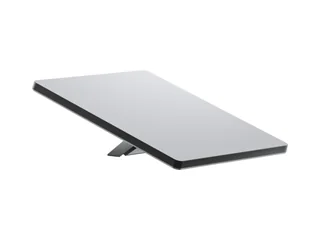
Starlink Mini
Why it's our top pick
- Fits in a laptop bag — stow it in any locker between uses
- Lowest power consumption of any Starlink dish — 20–40W average and 15W idle, per Starlink, is manageable on modest house banks
- Built-in Wi-Fi — no separate router needed for small boats
- Weatherproof rating is genuinely marine-usable
- Price has dropped from $599 to $249 over 18 months — no longer a premium option
- Supported for in-motion use on Roam, just like the Standard 4 X
Trade-offs
- Plan options depend on your account and hardware — Starlink says kits can use most plans, but check the Subscription page before assuming Global Priority is offered on a Mini
- Requires manual pointing at setup with the app's alignment tool (the current Standard 4 X does too)
- Narrower field of view means slower reconnect if you shift at anchor
- Top speeds are lower than the Standard dish (~50-100 Mbps vs 100-200)
- Needs DC power or a dedicated inverter — the included USB-C PD 100W charger is wrong for boats
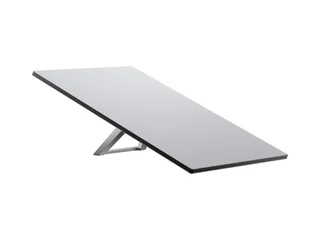
Starlink Standard 4 X (Roam Kit)
Where it still wins
- Works with Starlink's own DC-DC power supply (select markets) — no inverter needed
- Higher peak speeds than Mini (100-200+ Mbps)
- Wider field of view means less dropout as the boat moves
- Better in weak signal environments at high latitudes
- Can be installed permanently with the Flat Mount accessory
Why we don't usually recommend it
- Bigger and heavier than the Mini, with roughly 3× its average power draw (75–100W vs 20–40W, per Starlink), for speed gains most boaters don't need
- Same price-to-Mini gap doesn't justify the larger footprint for most boats < 45 ft
- Less portable — harder to lock away or take with you
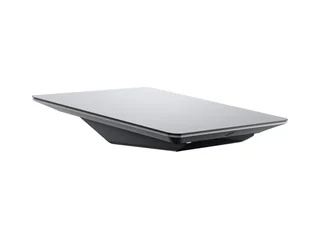
Starlink Performance (Gen 2) — formerly Flat High Performance
Why it exists
- Widest field of view of any Starlink dish — Starlink says it sees 35% more sky than the Standard and stays connected better when the vessel rolls or rocks
- Ships with a wedge mount for permanent installation, tilted 8° to shed water
- IP56 rated (with cables installed) and rated to survive 174 mph+ winds
- Better in heat — Starlink quotes typically 3× the download speed of the Standard above 35°C (95°F)
- Starlink now sells a Performance (Gen 3) kit to Business customers, with AC or DC input, IP69K rating and a lower 70W average draw — ask about it when you order
Trade-offs
- Sold through Starlink Business, with hardware priced at order, plus $250/mo minimum for Global Priority — an order of magnitude more than a Mini on Roam
- Significantly larger and heavier — needs a proper mounted location, not a lazarette-stow
- Highest power draw of the four: 110–150W average and 45W idle, per Starlink, and the Gen 2 runs on AC only, so plan on an inverter
- Pricing logic only makes sense if you're regularly beyond 12nm, need charter-grade uptime in a seaway, or run a commercial operation
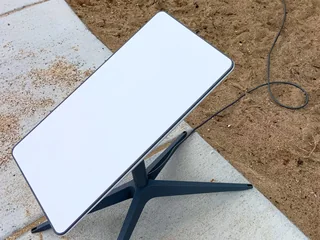
Used Starlink Standard Actuated (eBay route)
Why technical boaters love it
- Can be the cheapest way onto Starlink — compare used prices against the $249 Mini and the $349 new Standard 4 X before you bid
- Still supported: Starlink says it works on the same service plans as the current Standard, Roam included
- Lower average draw than the current Standard — 50–75W vs 75–100W, per Starlink's power specs
- Built-in motor points the dish itself at setup — no fiddling with the app's alignment tool
- Perfect for "try Starlink for a season" without buying new hardware
Real risks
- Buy the rectangular dish on a mast with an X-shaped base — not the round original ("Standard Circular"). Listings titled "v2" can mean either, and Starlink's current power and DC-power pages don't cover the round dish
- AC only: the power supply is built into the router, and Starlink's DC-DC supply fits only the Standard 4 and 4 X — plan on an inverter. The router is "configured for indoor use," so mount it below deck
- Motorized, so Starlink doesn't recommend it for in-motion use — treat it as an at-anchor dish. It takes mast-style mounts, not the kickstand mounts sold for the Standard 4 X
- The seller must cancel service and use "Transfer" in their Starlink account before you can activate it; rented kits can't be transferred at all. Get the Starlink identifier (kit number) before you pay
- Starlink's Roam activation charge on Standard kits isn't transferable, so expect to pay it on your own account
- Make sure the router (it contains the power supply) and the 50 ft cable are included; condition is seller-described and often inaccurate
The in-motion rule that trips up most buyers
The most misunderstood element of Starlink for boats is what's allowed under way. Earlier versions of this guide described a 10 mph cutoff for everything but the top-end dish. That isn't Starlink's rule. Here's the clean version, from Starlink's own "Can I use Starlink in-motion?" help article.
Which plans: Roam (100GB, 300GB and Unlimited), Local Priority and Global Priority all support in-motion use up to 100 mph (87 knots) in authorized locations. Residential plans don't, and a line paused in Standby Mode isn't meant for in-motion use.
Where: Roam covers inland waterways and territorial waters, out to 12 nautical miles from shore. Local Priority is inland only — lakes and rivers, no coastal or territorial waters. Beyond 12nm you need Global Priority, or Roam Unlimited with Ocean Mode switched on.
Which dish: Starlink lists the Mini, Standard 4, Standard 4 X and Performance (Gen 2 and Gen 3) as supported for in-motion use. Motorized "actuated" dishes — the Standard Actuated and Performance (Gen 1) — are not recommended in motion, and Starlink warns that damage while moving may void the warranty. That's why our used-dish pick is an at-anchor dish.
In-motion use also needs local government approval. Starlink's list of approved markets includes the United States, Canada and the Bahamas, but some countries — Mexico, Japan and Malaysia among them — allow it only at sea, not on land. If you're cruising abroad, check Starlink's "Where can I use Starlink in-motion?" page before you rely on it under way.
For the vast majority of recreational boaters — weekenders, coastal cruisers, ICW traffic, lake users — the in-motion rules are a non-issue: a Mini or Standard 4 X on Roam is allowed under way at any speed short of 100 mph. The questions that actually decide your setup are how far offshore you go and whether your dish has a motor.
Our picks in detail
Four picks for four distinct boater profiles. Pick the one that matches how you actually use your boat, not how you imagine you might.
Top pick: Starlink Mini + Roam 100GB ($249 + $55/mo)
This is the right answer for 80% of people reading this guide. You have a boat. You go out on weekends and the occasional longer trip. You want Netflix at anchor, video calls from the marina, and weather downloads before you head out. You don't go offshore — you stay inside the 12nm line, at anchor or under way.
The Mini is small enough to stow when you're not aboard, draws little enough power to run off house batteries, and costs $100 less than a Standard 4 X while drawing roughly a third of the power. 100 GB per month is roughly 30 hours of HD Netflix or 100+ hours of video calls — plenty for most boaters.
Upgrade: Starlink Mini + Roam Unlimited ($249 + $175/mo)
Same hardware, bigger plan. This is for liveaboards, remote workers, digital nomads, or anyone who uses the boat as their primary home part of the year. The $120/month difference buys you unlimited data, international use, and the Ocean Mode option for offshore passages (pay-as-you-go at $6/GB from 27 September 2026).
If you're running a video-call-heavy job from the boat, streaming 4K, or uploading large files (photographers, videographers, content creators working from a boat), the unlimited plan pays for itself versus the data cap on Roam 100GB.
Offshore: Starlink Performance + Global Priority 50GB (Starlink quote + $250/mo)
The serious boater's Starlink. This is for bluewater cruisers making Atlantic/Pacific passages, charter captains whose guests expect uptime offshore, expedition yachts, and anyone who spends real time beyond 12nm and needs more than a few gigabytes out there. The Performance dish's wider field of view holds satellites better as the boat rolls, and Global Priority is the plan Starlink builds for ocean use.
Global Priority 50GB alone is $3,000 a year before hardware, so this isn't a casual purchase. But it's still a fraction of what an equivalent VSAT setup cost five years ago, and for charter operations where the boat's earning potential depends on guest connectivity, it can pay for itself quickly. If you cross an ocean once a season, price out Roam Unlimited + Ocean Mode first.
Budget: Used Standard Actuated dish + Roam 100GB (used price + $55/mo)
The eBay play. If you're technically comfortable and risk-tolerant, a used Standard Actuated — the rectangular, motorized dish Starlink sold before the kickstand Standard — runs on the same Roam plans as a new $349 kit, according to Starlink. Compare used prices against the $249 Mini and $349 new Standard before you bid, and remember it's an at-anchor dish: Starlink doesn't recommend its motorized models for in-motion use.
Buy only from a seller who will cancel their service and use Starlink's "Transfer" option to release the dish, and ask for the Starlink identifier (kit number) before paying — rented kits can't be transferred at all. Make sure the router is included, since it contains the power supply; Starlink has no DC power supply for this dish, so budget for an inverter. Starlink's Roam activation charge isn't transferable, so expect to pay it on your own account.
The power draw reality
Starlink isn't free electricity. Starlink publishes average and idle draw for each kit, including the router, power supply and cables:
- Starlink Mini — 15W idle, 20–40W average. Left on around the clock, that's about 480–960 Wh/day.
- Starlink Standard 4 / 4 X — 20W idle, 75–100W average. Around the clock: 1,800–2,400 Wh/day, more than double the Mini.
- Standard Actuated (our used pick) — 20W idle, 50–75W average: 1,200–1,800 Wh/day.
- Starlink Performance (Gen 2) — 45W idle, 110–150W average: 2,640–3,600 Wh/day.
Starlink notes these are AC-input averages and that real draw varies with temperature, location and how hard you use the connection. For a sailboat with a 400 Ah battery bank at 12V — 4.8 kWh nominal, about 2.4 kWh usable from lead-acid at 50% depth of discharge — running Starlink 24 hours a day would take 20–40% of that usable capacity with a Mini, 75–100% with a Standard 4 X, and more than the whole bank with a Performance dish. This is why Mini is our top pick for sailboats specifically, and why most cruisers switch the dish off when nobody's using it — power is a finite resource, and Starlink can easily become the largest single draw on the boat.
A solar install that offsets Starlink consumption, using our solar guide's assumptions (8 hours of use a day, 4 peak sun-hours), is roughly 100W of panel for the Mini and 250W for the Standard 4 X. Pair with a lithium bank and you've eliminated the power question entirely. See our solar power for smart boats guide for panel sizing, controller picks, and a full kit shopping list.
Starlink dishes want specific input voltages (usually 48V DC or AC via inverter). Running them off 12V boat batteries means either: (1) an inverter + stock power supply, which wastes 10-15% to conversion losses, or (2) a dedicated 12V-to-Starlink DC-DC converter from Yaosheng, VoltaicSystems, or Parnell Power. The DC-DC route is more efficient and eliminates a failure point but adds $80-150 to the setup cost.
Installation and mounting
Installation varies from "set it on the cockpit seat" to "permanent radome mount at the masthead." For recreational boaters, simpler is better.
Temporary / portable install
For the Mini specifically: put it on the cabin top, run a 20-foot power cable through a hatch or existing cable gland, connect power. Deploy when needed, stow when done. Takes 60 seconds and survives salt air fine because it's indoors when not in use.
Semi-permanent install
RAM mounts, Scotty mounts, and a few boat-specific Starlink brackets let you mount a Mini on a rail, arch, or existing antenna pole. This keeps it deployed while aboard but removable when you leave. Amazon sells dozens of these; most are $30-$80.
Permanent install
For the Standard 4 X and Performance dishes, permanent mounting on a mast, arch, or T-top is usually how they're installed. The Performance (Gen 2) ships with a wedge mount for permanent installation; arch mounts for the Standard 4 X run $150-$300. Budget an afternoon and someone with marine-grade electrical skills if you're running high-gauge DC power through the boat.
Starlink needs a clear view of the sky above about 20° elevation in all directions. A dish mounted on a bimini frame with the boom, rigging, and mast obscuring parts of the sky will have visible dropouts. Masthead or T-top mounting gives the cleanest sky view; rail-mounting at deck level is cheaper but the least reliable.
Why you probably also want Iridium
Starlink is broadband internet. Iridium is a different thing: a genuinely-global, low-bandwidth, mission-critical satellite network that works in conditions where Starlink doesn't. Offshore cruisers should consider having both, for different reasons.
Starlink requires line-of-sight to low-earth-orbit satellites overhead. Rain, heavy cloud cover, and vessel motion interrupt service. At anchor in calm weather, it's rock-solid. In a squall line or with the boat heeled over at 20 degrees, it drops.
Iridium uses a 66-satellite low-earth-orbit network with global coverage including the poles. It works through weather, at any boat angle, and anywhere on the planet — but at satellite-phone speeds (2-88 kbps), not broadband. You use Iridium for short text messages, weather GRIB downloads, and voice calls when Starlink is unavailable.
The Iridium GO! exec is the modern iteration — a Wi-Fi hotspot that connects your phone/laptop to the Iridium network via its own app. Voice, text, email, WhatsApp, weather services, basic social media all work at satellite-phone speeds. Think early-2000s-internet bandwidth, not streaming video, but truly anywhere.
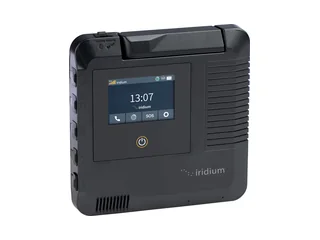
Iridium GO! exec — the Starlink complement
Why offshore boaters keep both
- Works when Starlink doesn't — bad weather, heavy seas, polar latitudes
- Tiny power draw (runs on internal battery for hours)
- SOS emergency calling works globally — backup to PLB/EPIRB
- Weather file downloads (PredictWind, GRIB files) are efficient on Iridium
- Plans are seasonal — activate just for passages, deactivate otherwise
Trade-offs
- Not real internet — no streaming, video calls, or meaningful browsing
- Hardware is expensive for what it does
- Monthly plans add up for full-time offshore use
- Useless for coastal/inland boating where Starlink already covers you
For coastal-only boaters, skip Iridium. For anyone doing offshore passages, treat the GO! exec as a safety device more than a connectivity device — a backup to your primary Starlink and a complement to your EPIRB for SOS capability. Bluewater cruisers typically have both, often layered on top of a cellular boat monitoring setup that handles unattended alerts near shore. Charter operations doing ocean crossings often have both plus a VSAT for redundancy.
Frequently asked questions
Can I use a Residential Starlink account on my boat?
Technically no — Residential plans require a fixed service address and use that address for satellite routing, and Starlink doesn't permit in-motion use on any Residential plan. Some boaters have used Residential plans while docked at a marina using their home address, but service is often unreliable because the dish is hundreds of miles from the registered location. Starlink has also been known to flag and restrict these accounts. Use Roam or Priority plans for actual boat use.
Does Starlink work when crossing oceans?
Only with Ocean Mode (Roam Unlimited + $6/GB) or Global Priority service. Roam 100GB and 300GB stop at 12nm from shore. For an Atlantic crossing of ~3,000 nm, budget Ocean Mode consumption of about 15-30 GB ($90-180 in data costs at $6/GB) if you're conservative with use.
Can I use Starlink while the boat is moving?
Yes. Starlink says Roam, Local Priority and Global Priority plans all support in-motion use up to 100 mph (87 knots) in authorized locations, on the Starlink Mini, Standard 4, Standard 4 X and Performance (Gen 2 and Gen 3) dishes. Roam covers inland waterways and territorial waters out to 12 nautical miles; Local Priority is inland only; beyond 12nm you need Global Priority or Roam Unlimited with Ocean Mode. Motorized (actuated) dishes are not recommended for in-motion use, and Residential plans don't allow it.
Can I pause service between seasons?
Yes, on any Roam plan. Log into the Starlink account, switch it to Standby Mode (a small monthly fee instead of the full plan), reactivate when you need it. This is the single most useful feature for budget-conscious seasonal boaters. Global Priority plans can also be paused but are often used year-round.
What about competitors — Amazon Kuiper, OneWeb?
Amazon's Project Kuiper is launching satellites through 2026 but consumer hardware isn't yet available in the US. OneWeb is primarily focused on enterprise and maritime commercial customers, not recreational boaters. For the next 12-24 months, Starlink remains the only realistic LEO broadband option for recreational boats. Revisit when Kuiper's consumer product ships.
Will it replace my cellular router?
Not entirely. Cellular is still faster and cheaper within 10 miles of shore in most US coastal areas. Many cruisers run both — a Pepwave router for close-to-shore cellular plus Starlink for farther-out broadband. A router that supports "SIM + Starlink failover" (Pepwave MAX Transit Mini and similar) is the cleanest setup for boats that want the best of both. See our cellular router buyer's guide for the full comparison.
The short version
For most recreational boaters in 2026, the answer is Starlink Mini + Roam 100GB. $249 for the dish, $55/month for service. Deploy it from your cockpit, stream Netflix at anchor, pause the plan between trips. Pay way less than $300/month and have genuinely good internet at sea — a thing that was impossible for anyone except billionaires five years ago. For liveaboards, upgrade to Roam Unlimited. For offshore cruisers, add Ocean Mode when you need it. For charter captains and bluewater cruisers who spend real time beyond 12nm, step up to a Starlink Performance dish on Global Priority ($250/mo and up). A Mini or Standard 4 X on Roam is allowed under way — distance from shore is the limit, not speed. For everyone, an Iridium GO! exec is a worthwhile backup — satellite phone safety net when Starlink doesn't work.